WordPress- & PHP-Sicherheit

A firewall blocks the attack.BitFire blocks the damage.

BitFire Pro stops exploited plugins from changing your files, database, or administrator accounts - even when the vulnerability is brand new.

  • Typische Einrichtung: 5 Minuten
  • Keine Kreditkarte erforderlich

Pro für Unternehmen ansehen

Mit einem Sicherheitsingenieur sprechen

Protection at every layer

Application Filesystem Database
Write Lock
Prevent any vulnerability from infecting your site with malware
4,000+
Configurable bots with pre-configured access controls
A+
Rated WAF & RASP · rated by Cloudbric
5 Min
Setup time · Click configure or copy config files
Schutz, den Sie überprüfen können

Sehen Sie genau, was geschützt ist.

Runtime Application Self-Protection (RASP) prüft, was Ihre Anwendung zu tun versucht – nicht nur die Anfrage, die sie erreicht hat. BitFire Pro ergänzt die Anfragefilterung der Firewall um Autorisierungsprüfungen für geschützte Datei- und Datenbankoperationen.

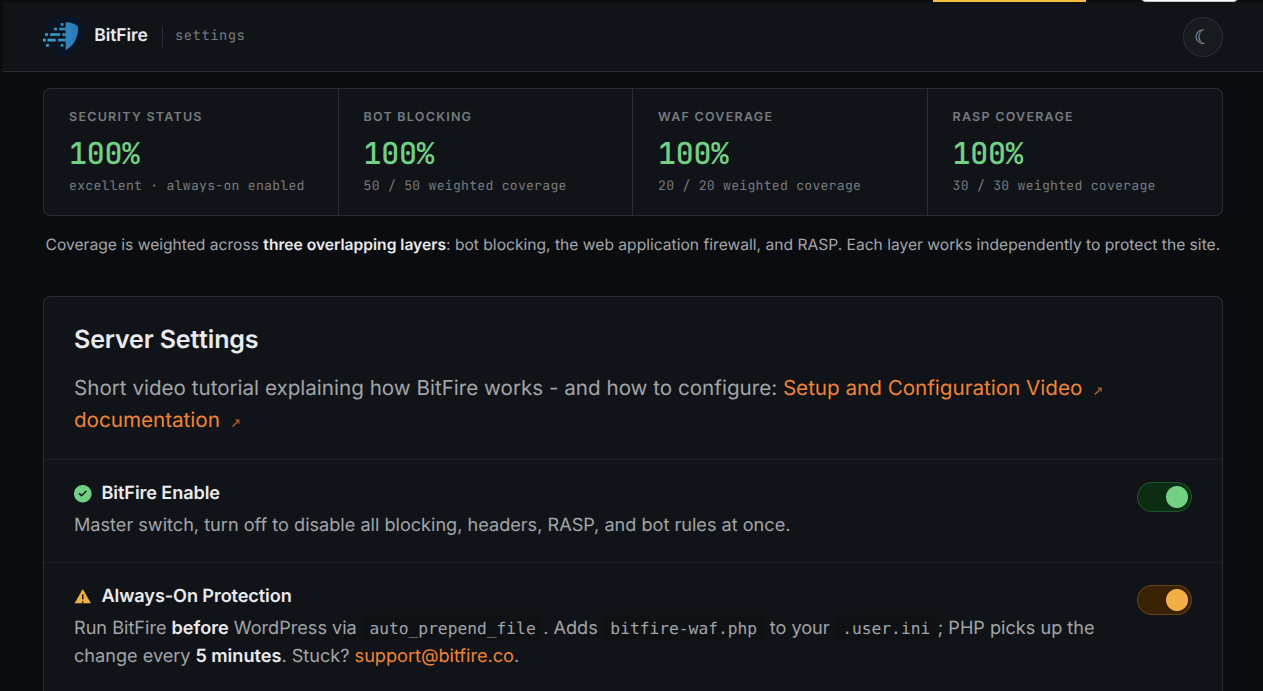
Die 100-%-Werte in diesem Produktbeispiel beschreiben die für diese Konfiguration bewerteten Kontrollen – nicht den Schutz vor jeder Schwachstelle oder eine unabhängige Zertifizierung.

BitFire-Pro-Laufzeitkontrollen ansehen →
BitFire · Schutzabdeckung
Beispielhafter BitFire-Einstellungsbildschirm mit Konfigurations-Abdeckungswerten und Schutzkontrollen
Beispielhafte SchutzeinstellungenAbdeckungswerte beschreiben bewertete Kontrollen, keine Garantie gegen jeden Angriff.
  1. Abdeckungswerte fassen bewertete Konfigurationskontrollen zusammen.
  2. Schutzschalter zeigen, welche Kontrollen aktiviert sind.
Screenshot vergrößern
BitFire in Aktion ansehen

Eine zweiminütige Produkttour.

Sehen Sie Anfragefilterung und Pro-Laufzeitschutz in Aktion.

Eine Schutzschicht reicht nicht aus

Filtern. Durchsetzen. Untersuchen.

Drei Aufgaben – mit den Nachweisen, um zu prüfen, was passiert ist.

Regeln, die auf Ihre Website zugeschnitten sind

Prüfen Sie schädliche Eingaben, überprüfen Sie Traffic-Ausnahmen und wenden Sie Bot-Richtlinien anhand verfügbarer Netzwerknachweise an – nicht nur anhand eines User-Agents.

Vertrauen Sie dem Netzwerk, nicht dem Namen →

Operationen mit Pro schützen

Prüfen Sie die Autorisierung für geschützte PHP-Schreibvorgänge, Datenbankoperationen und Administratoränderungen. Die Abdeckung hängt von den aktivierten Kontrollen ab.

Laufzeitkontrollen prüfen →

Verdächtigen Code finden

Verhaltensbasierte Scans markieren potenziell schädlichen Code. KI-gestützte Analyse hilft Ihnen zu prüfen, was erlaubt, repariert oder entfernt werden soll. Eine Markierung ist kein Infektionsnachweis, und KI-Analysen können falsch liegen. Prüfen Sie die Nachweise und sichern Sie Dateien vor Änderungen.

Verstehen, warum es markiert wurde →
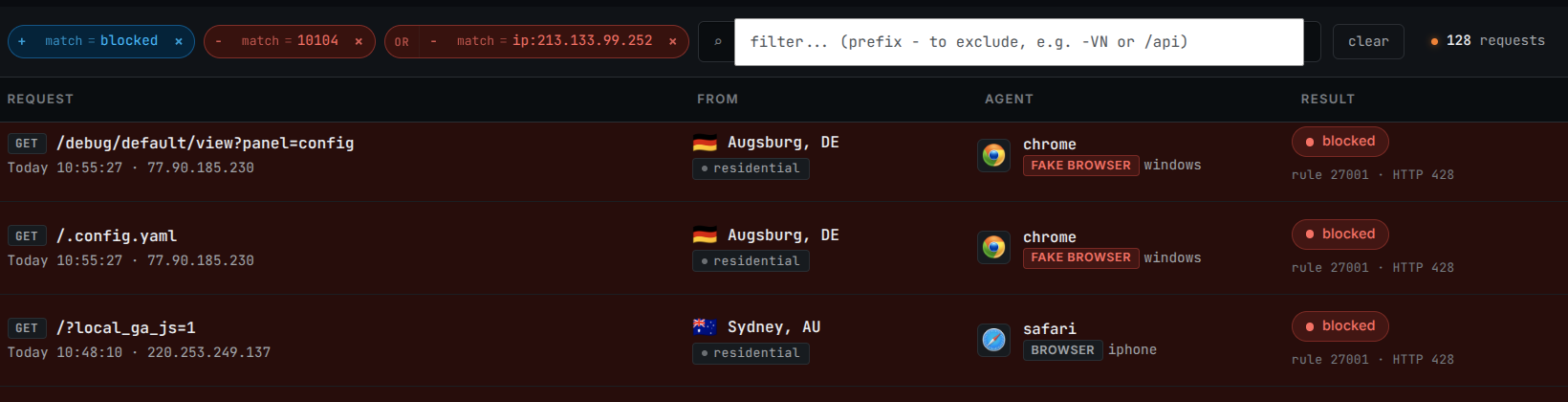
BitFire · Aktivität anfordern

Wischen oder scrollen Sie über das Bild; vergrößern Sie es für Details in voller Größe.

Zugeschnittenes BitFire-Anfrageprotokoll mit Suchfiltern, blockierten Anfragen, Client-Standorten und Regelentscheidungen
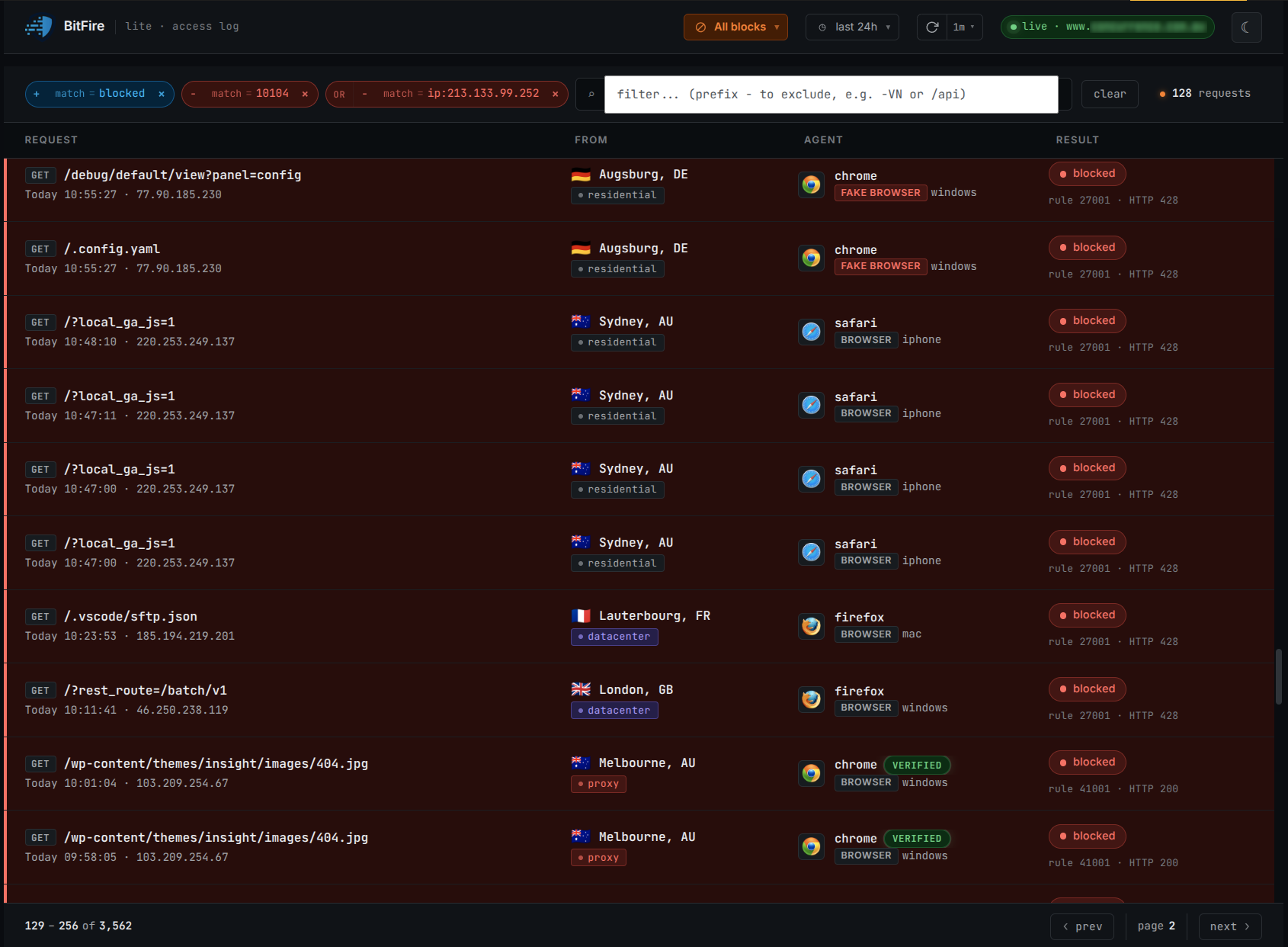
Den Traffic Ihrer Website verstehenDurchsuchen Sie blockierte und erlaubte Anfragen, um zu sehen, was Ihre Website erreicht hat, was BitFire gestoppt hat und warum.
  1. Anfragen filtern um die zu prüfenden Aktivitäten einzugrenzen.
  2. Entscheidung lesen zusammen mit Anfrage und Regel.
  3. Quelle prüfen zusammen mit Client- und Netzwerkinformationen.
Screenshot vergrößern
Vulnerability protection

Built for real WordPress attack paths.

BitFire is designed to protect the places attackers target most: malicious requests, unauthorized file changes, suspicious database activity, and abusive bot traffic. Our vulnerability writeups show how those protection layers apply to real WordPress security issues.

Selected protection examples Real WordPress vulnerabilities from the 2024–2026 article collection
Mapped to BitFire controls

Each example connects a known vulnerability pattern to BitFire controls that can help block exploitation, limit damage, and surface evidence for review. Use BitFire as an active protection layer while keeping WordPress, themes, and plugins updated.

Komponente Offizieller CVE-Eintrag CNA CVSS 3.1 Bewertete BitFire-Kontrollen
Forminator Forms CVE-2026-15748 offizieller Eintrag 9.8 · Kritisch Bot-Richtlinie + Pro-Dateischutz

Bewertet die Blockierung automatisierter Übermittlungen und die unautorisierte Erstellung von PHP-Dateien. Ergebnisse hängen von Client-Richtlinie, Upload-Ziel und aktivierten Kontrollen ab.

Meta Box AIO: MB Frontend Submission CVE-2026-14488 offizieller Eintrag 9.1 · Kritisch Pro-Autorisierungskontrollen für Datenbanken

Bewertet Autorisierungsprüfungen beim Löschen von Beiträgen und Seiten. Dies ist die mechanismusbasierte Bewertung des Artikels, kein reproduziertes Exploit-Ergebnis.

WordPress Core: WP2Shell Security Vulnerability CVE-2026-63030 offizieller Eintrag 9.8 · Kritisch Bot-Richtlinie + WAF + Pro-Administratorkontrollen

Bewertet Client-Verifizierung, SQL-Injection-Prüfung und unautorisierte Administratorerstellung. Die Wirksamkeit hängt von Richtlinie, Payload und geschützter Operation ab.

Showing 3 of 12 protection records. Index rebuilt 4. September 2026. Official CVE records provide vulnerability details used to map relevant BitFire request, bot, file, and database protections. Alle Schutzeinträge ansehen
Customer confidence

Trusted by site owners who need real protection.

BitFire helps teams secure WordPress sites, recover from threats, and keep protection in place as attacks evolve.

Trond André
Trond André BitFire customer
“It works!”
Mark Sullivan
Mark Sullivan BitFire customer
“The team at BitFire walked us through the entire install process, removed all the malware, and fully protected all our sites. I’ll never run a site without it again.”
Fast path to protection

From installation to enforcement.

BitFire integrates with WordPress and its PHP runtime, builds a baseline of legitimate traffic, and applies your configured protection controls.

01

Connect your website

Typical setup takes five minutes, followed by a traffic-learning period. Free for non-commercial sites; business sites require Pro.

02

Build a site-specific baseline

Adaptive rules learn what your real visitors, applications, browsers, and approved bots need.

03

Review, then enforce

Review exceptions before enforcement. Pro adds runtime authorization checks to the firewall’s request filtering.

Follow the installation guide →
Choose your protection

Start with basic protection. Upgrade for stronger security.

BitFire Free helps add essential protection to a site. BitFire Pro adds deeper safeguards for sites where security, uptime, and active enforcement matter most.

Basic protection

Free

Essential firewall, bot, and malware scan tools for sites that need a simple protection baseline.

  • Firewall and bot blocking / verification
  • Manual malware scanning
  • 12 AI credits for the lifetime of the domain
  • Self-managed setup with a fast path to protection
Protect my site free
Advanced site security

Pro

Deeper protection for sites that want stronger assurance, runtime enforcement, scheduled scanning, and more security visibility.

  • Firewall and bot protection, plus Always-On Protection
  • Runtime file, database, and administrator protection
  • Scheduled malware scans and Threat Hunter
  • 1,000 AI malware analysis credits; self-managed by default
View Pro
Paid Pro add-ons

Managed

Let BitFire handle installation and ongoing care.

  • Installation, configuration, and operational tuning
  • Ongoing monitoring and legitimate-traffic review
  • Managed Protection: normal U.S. business hours
  • Priority Support: 24/7 coverage and a one-hour response time
Compare support options

Want help choosing the right protection level or support option? Talk with a security engineer about your site, risks, and operating needs.

Explore the details: protection features · malware scanning · licensing and support.

For site owners, agencies, and security teams: explore portfolio and enterprise use cases →

Compare request filtering and runtime enforcement

This compares control boundaries, not named products, their current features, or test results.

Complementary control boundaries, not a product ranking
Control boundaryRequest filteringRuntime enforcement
Main questionShould this request reach the application?Is this protected operation authorized?
SignalsRequest content, client identity, and traffic policyApplication identity, permissions, and the operation attempted
Enforcement pointBefore the request reaches the vulnerable handlerWhen application code attempts a protected action
Examples in BitFireBot policies and SQL-injection request inspectionPro checks on protected PHP writes and administrator changes
LimitsCoverage depends on inspection, rules, and exceptionsCoverage depends on supported operations, configuration, and authorization context

Neither layer replaces patching, access control, or recovery planning. Review BitFire’s documented controls and configuration requirements →

Questions, answered

What teams ask before installing.

Need to evaluate BitFire for a specific stack? Talk directly with a security engineer.

Talk to a security engineer
How do BitFire’s firewall and runtime controls work together?
The firewall evaluates incoming requests. BitFire Pro also checks authorization when WordPress attempts protected file, database, or administrator operations. These are complementary controls; capabilities vary across security products and configurations.
Does BitFire only work with WordPress?
The current product is for WordPress and its PHP runtime. For a standalone PHP application, contact the team to confirm availability and compatibility before planning a deployment.
Can BitFire help with an already hacked website?
The scanner can help you investigate suspicious files. For cleanup or incident-response assistance, contact a security engineer to confirm the work and service scope. Installing a firewall does not by itself remove an existing compromise.
How should we measure protection overhead?

Overhead depends on hosting, PHP and plugin activity, enabled controls, traffic, and cache state. We do not publish a fixed latency figure here because a reproducible benchmark report is not available for this page.

Recommended measurement procedure, not a published test result:

  1. Use an isolated staging copy. Record CPU, memory, PHP, WordPress and BitFire versions, plugins, cache settings, enabled controls, and traffic-learning state.
  2. Use the same representative page, login, form, and API requests at a fixed request rate. Record cache state, warm-up, duration, repetitions, and sample count.
  3. Compare a baseline, firewall/bot controls, and Pro runtime controls separately. Record server processing time, median and 95th-percentile response time, errors, and CPU use for each run.
  4. Report the differences with the configuration and raw results. Do not disable protection on a live site for benchmarking.
Review protection and compatibility after setup →
How does BitFire handle legitimate bots?
BitFire can allow a bot from anywhere, authenticate it by source network, or block it completely. Network validation makes it harder for an attacker to bypass controls using a spoofed user-agent string.
Can we keep our current edge firewall or CDN?
BitFire’s runtime protection is designed to add application-level enforcement behind the edge. For enterprise environments, confirm the exact deployment pattern and compatibility requirements with the BitFire team.
Choose your next step

Start protecting your site.

Start protecting a site in minutes, or bring us your architecture and security requirements for a technical walkthrough.

Ready to install? Free for non-commercial sites. No credit card required.
Evaluating for a team? Request a focused technical demo.
Protect my site free

Protecting a business site? View Pro.

Talk to a security engineer

Tell us where you need stronger application protection.

Up to 5,000 characters. Do not include passwords or credentials.

We use your details to respond and keep relevant support records, including request time, IP address, and browser information. Privacy policy. You can also contact the team directly.

Produkt-Screenshot

Bild in voller Auflösung. Scrollen Sie, um Details zu prüfen; drücken Sie Escape oder „Screenshot schließen“, um zurückzukehren.

Originalbild in neuem Tab öffnen ↗
Schützen Sie meine Website kostenlos –