WordPress & PHP security

WordPress security. Beyond the firewall.

Block malicious requests. With BitFire Pro, stop unauthorized file and database changes inside your application—even when an exploit is new.

  • Typical setup: 5 minutes
  • No credit card required

Free for non-commercial sites. View Pro for business

Talk to a security engineer
Illustration · not a site scan
Protection at every layer
Application Filesystem Database
Test first
Performance depends on your stack
How to measure overhead →
4,000+
Reported bot identity catalog
24×7
Available with Priority Support
5 min
Typical setup time · traffic learning follows
Protection you can verify

See exactly what’s protected.

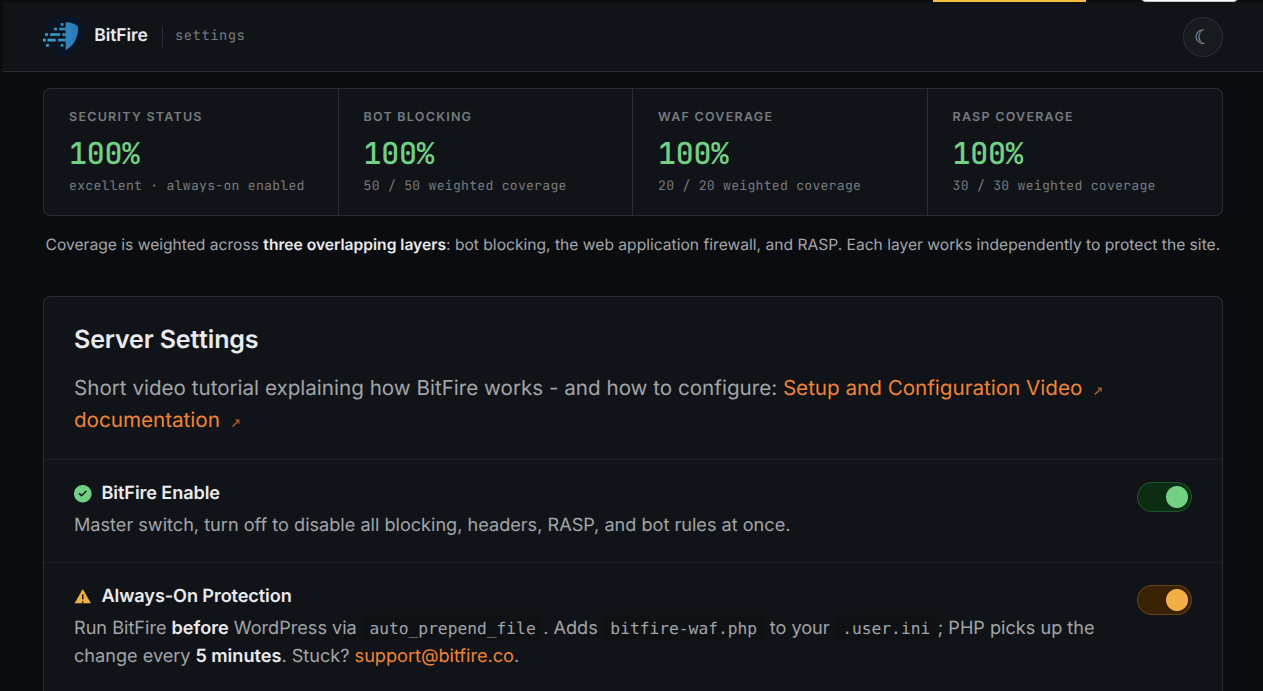
Runtime Application Self-Protection (RASP) checks what your application tries to do—not just the request that reached it. BitFire Pro adds authorization checks to protected file and database operations, complementing the firewall’s request filtering.

The 100% scores in this product example describe the controls assessed for that configuration—not protection against every vulnerability or independent certification.

Explore BitFire Pro runtime controls →
“It works!”
Trond AndréExcerpt from the customer’s review.
BitFire · Protection coverage
Example protection settingsCoverage scores describe assessed controls, not a guarantee against every attack.
  1. Coverage scores summarize assessed configuration controls.
  2. Protection switches show which controls are enabled.
Expand screenshot
Watch BitFire in action

A two-minute product tour.

See request filtering and Pro runtime protection in action.

One protection layer is not enough

Filter. Enforce. Investigate.

Three jobs, with the evidence to review what happened.

Rules tailored to your site

Inspect malicious input, review traffic exceptions, and apply bot policies using available network evidence—not a user-agent alone.

Trust the network, not the name →

Protect operations with Pro

Check authorization for protected PHP writes, database operations, and administrator changes. Coverage depends on enabled controls.

Review runtime controls →

Find suspicious code

Behavioral scanning flags potentially malicious code. AI-assisted analysis helps you review what to allow, repair, or remove. A flag is not proof of infection, and AI analysis can be mistaken. Review evidence and back up files before changes.

Understand why it was flagged →
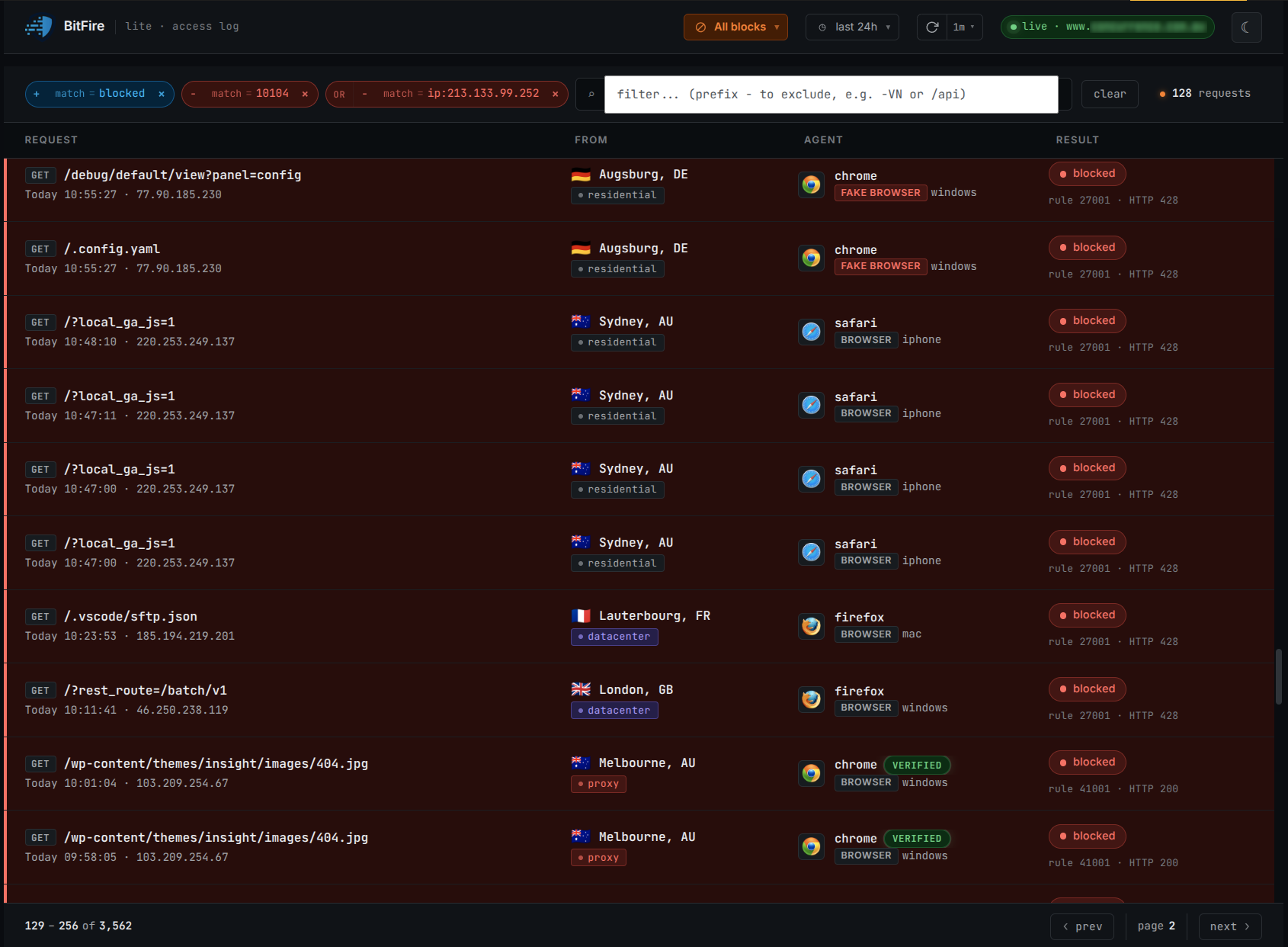
BitFire · Request activity

Swipe or scroll across the image; expand for full-size details.

Understand your site’s trafficSearch blocked and allowed requests to see what reached your site, what BitFire stopped, and why.
  1. Filter requests to narrow the activity you review.
  2. Read the decision alongside the request and rule.
  3. Check the source alongside client and network information.
Expand screenshot
Vulnerability analysis

Examine the attack. Check the controls.

These BitFire-authored analyses map specific WordPress vulnerabilities to relevant request and runtime controls. They describe possible interruption points—not a guarantee that every exploit variant is blocked.

Selected vulnerability assessments From the 2024–2026 article collection
Mechanism-based assessments

No reproduced exploit test is claimed here. Effectiveness depends on version, configuration, and the operation attempted; keep vulnerable software patched.

Component Official CVE record CNA CVSS 3.1 Assessed BitFire controls
Forminator Forms CVE-2026-15748 official record 9.8 · Critical Bot policy + Pro file protection

Assesses automated submission blocking and unauthorized PHP file creation. Results depend on client policy, upload destination, and enabled controls.

Meta Box AIO: MB Frontend Submission CVE-2026-14488 official record 9.1 · Critical Pro database authorization controls

Assesses authorization checks on post and page deletion. This is the article's mechanism-based assessment, not a reproduced exploit result.

WordPress Core: WP2Shell Security Vulnerability CVE-2026-63030 official record 9.8 · Critical Bot policy + WAF + Pro administrator controls

Assesses client verification, SQL-injection inspection, and unauthorized administrator creation. Effectiveness depends on policy, payload, and protected operation.

Showing 3 of 12 article records. Index rebuilt September 4, 2026. Official CVE records support vulnerability metadata, not BitFire effectiveness. Installation estimates are omitted; they do not establish how many sites are vulnerable. View all protection records
Mark Sullivan
“The team at BitFire walked us through the entire install process, removed all the malware, and fully protected all our sites. I’ll never run a site without it again.”
Fast path to protection

From installation to enforcement.

BitFire integrates with WordPress and its PHP runtime, builds a baseline of legitimate traffic, and applies your configured protection controls.

01

Connect your website

Typical setup takes five minutes, followed by a traffic-learning period. Free for non-commercial sites; business sites require Pro.

02

Build a site-specific baseline

Adaptive rules learn what your real visitors, applications, browsers, and approved bots need.

03

Review, then enforce

Review exceptions before enforcement. Pro adds runtime authorization checks to the firewall’s request filtering.

Follow the installation guide →
Choose your protection

Free for personal use. Pro for business.

Choose a license, then decide who manages protection. Managed service is an add-on to Pro—not a separate firewall.

Non-commercial sites only

Free

For personal blogs, charities, and other non-commercial sites.

  • Firewall and bot blocking / verification
  • Manual malware scanning
  • 12 AI credits for the lifetime of the domain
  • Self-managed setup; runtime enforcement requires Pro
Protect my site free
Commercial license

Pro

Required for business, agency, client, and ecommerce sites.

  • Firewall and bot protection, plus Always-On Protection
  • Runtime file, database, and administrator protection
  • Scheduled malware scans and Threat Hunter
  • 1,000 AI malware analysis credits; self-managed by default
View Pro
Paid Pro add-ons

Managed

Let BitFire handle installation and ongoing care.

  • Installation, configuration, and operational tuning
  • Ongoing monitoring and legitimate-traffic review
  • Managed Protection: normal U.S. business hours
  • Priority Support: 24/7 coverage and a one-hour response time
Compare support options

Need offsite backups or a dedicated Security Operations Center (SOC)? Confirm availability and scope with a security engineer; neither is listed as a standard inclusion in these plans.

Explore the details: protection features · malware scanning · licensing and support.

For site owners, agencies, and security teams: explore portfolio and enterprise use cases →

Compare request filtering and runtime enforcement

This compares control boundaries—not named products, their current features, or test results.

Complementary control boundaries, not a product ranking
Control boundaryRequest filteringRuntime enforcement
Main questionShould this request reach the application?Is this protected operation authorized?
SignalsRequest content, client identity, and traffic policyApplication identity, permissions, and the operation attempted
Enforcement pointBefore the request reaches the vulnerable handlerWhen application code attempts a protected action
Examples in BitFireBot policies and SQL-injection request inspectionPro checks on protected PHP writes and administrator changes
LimitsCoverage depends on inspection, rules, and exceptionsCoverage depends on supported operations, configuration, and authorization context

Neither layer replaces patching, access control, or recovery planning. Review BitFire’s documented controls and configuration requirements →

Questions, answered

What teams ask before installing.

Need to evaluate BitFire for a specific stack? Talk directly with a security engineer.

Talk to a security engineer
How do BitFire’s firewall and runtime controls work together?
The firewall evaluates incoming requests. BitFire Pro also checks authorization when WordPress attempts protected file, database, or administrator operations. These are complementary controls; capabilities vary across security products and configurations.
Does BitFire only work with WordPress?
The current product is for WordPress and its PHP runtime. For a standalone PHP application, contact the team to confirm availability and compatibility before planning a deployment.
Can BitFire help with an already hacked website?
The scanner can help you investigate suspicious files. For cleanup or incident-response assistance, contact a security engineer to confirm the work and service scope. Installing a firewall does not by itself remove an existing compromise.
How should we measure protection overhead?

Overhead depends on hosting, PHP and plugin activity, enabled controls, traffic, and cache state. We do not publish a fixed latency figure here because a reproducible benchmark report is not available for this page.

Recommended measurement procedure—not a published test result:

  1. Use an isolated staging copy. Record CPU, memory, PHP, WordPress and BitFire versions, plugins, cache settings, enabled controls, and traffic-learning state.
  2. Use the same representative page, login, form, and API requests at a fixed request rate. Record cache state, warm-up, duration, repetitions, and sample count.
  3. Compare a baseline, firewall/bot controls, and Pro runtime controls separately. Record server processing time, median and 95th-percentile response time, errors, and CPU use for each run.
  4. Report the differences with the configuration and raw results. Do not disable protection on a live site for benchmarking.
Review protection and compatibility after setup →
How does BitFire handle legitimate bots?
BitFire can allow a bot from anywhere, authenticate it by source network, or block it completely. Network validation makes it harder for an attacker to bypass controls using a spoofed user-agent string.
Can we keep our current edge firewall or CDN?
BitFire’s runtime protection is designed to add application-level enforcement behind the edge. For enterprise environments, confirm the exact deployment pattern and compatibility requirements with the BitFire team.
Choose your next step

Start protecting your site.

Start protecting a site in minutes, or bring us your architecture and security requirements for a technical walkthrough.

Ready to install? Free for non-commercial sites. No credit card required.
Evaluating for a team? Request a focused technical demo.
Protect my site free

Protecting a business site? View Pro.

Protect my site free →